
< All Topics
Print
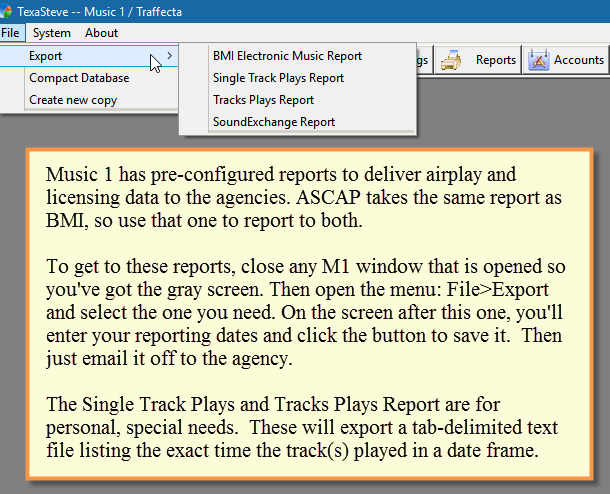
BMI, ASCAP and SoundExchange Reports
These reports are built into M1, you don’t have to create one yourself.
Posted
Updated
Bystevewarren
-
Categories
- Categories 101 - The Need To Know Basics
- Category Rules 101
- How Do I Change the Scheduling Order Of My Categories?
- Selection Categories
- Shuffling Categories
- Shuffling Categories - Update
- Shuffle the HOT category weekly? Is that good to do?
- Shuffle and Shuffling Categories
- Rotation Prediction - Average Turnover Chart
- Packets? How Do I Use Them?
- Packets - When To Packet
- Packets - How do I create a packet?
- Packet Removal
- Packets - No Rotation Prediction
- The Flip/Don't Flip Category Rule
- A Question About The Average Turnover Number
- Play Number
- Play Number Explained In Detail
- Play Number Option
- Play Number, Total Plays and Category Spins
- Can I Search For Songs From A Specific Year?
- Category View Design
- Category - Rank Order Fix
- Category Rotation Changes With Clocks
- Controlling the Tempo Mix
- Customizing the Start/End Date Columns
- How can I set it so a song doesn't repeat for 14 days?
- How can I change the way the 'date added' field is displayed?
- Help Me With My Rotations
- How Can I Make Some Songs By An Artist Play More Than Other Songs By The Artist?
- How do I make a simple report that will show me the percentage of plays by Category? I want to see if my formatting is delivering 15% Hot Current, 20% Medium Current and so on.
- How Do I Change The Fonts In My Categories?
- How does Title Separation work within the categories?
- I'm not seeing the rotation grid..says "category not included in any clock" or something like that for each category??
- Play By Percentage
- Power Oldie Rotation Evaluation - What To Look For
- Allow Repeat Play After x-% of Tracks Have Played
- Selection Category - Removing
- Removing Duplicates
- Recycle Categories
- On one of my rotation prediction charts, I've got some Orange squares mixed in with the normal Blue squares. What's up with that?
- On the Category Rules screen, I see: Maximum Number of Choices and an option to "set automatically." What exactly is that feature?
- Show all articles ( 27 ) Collapse Articles
-
Clocks
- Format Clocks 101
- Over Ruled
- New Clock to Dayformat (Hour Clock Lineup)
- Linked Tracks - Hit Year
- Linked Tracks - Advanced
- Linked Tracks - Linking To Songs
- Clock Rules: Separation vs Run
- Category Rotation Changes With Clocks
- Scheduling Rules - Basic Settings
- Adding Spot Break Units
- Importing Traffic Log Files
- Clock Rules - Mass Change Sound Code Rules
- Can I set it so the hour will never end with a song that has a “cold” ending?
- Clock Rules - Female Separation
- Managing Female Content
- Clock Rules Time/Content
- Controlling the Tempo Mix
- Format Clock - Clusters
- How Do I Tell M1 To Schedule An Item At A Specific Time?
- How do I merge my commercials into M1?
- How do I add Spot Break Markers to my clocks?
- Clock Items - How To Mass Change
- Formatting Christmas with Music 1
- How can I schedule programs that are more than an Hour in length?
- How To Delete A Format Clock
- I'm not seeing the rotation grid..says "category not included in any clock" or something like that for each category??
- Can I Schedule Some Hours With No Slow Songs At All?
- Importing Natural Log advertising logs.
- TrafficONE Spot Breaks - Fixed Start Time Enabled
- Tempo / Transition Jingles
- Linked Tracks - Video
- Show all articles ( 16 ) Collapse Articles
-
Formatting
- A Primer On Three Formatting Basics
- Adding Spot Break Units
- Over Ruled
- Formatting Syndicated Shows - Wolfman Jack
- Formatting Hit Year Stagers
- Formatting Hit Year Stagers - Second Option
- Formatting No Repeat Workdays
- Format An Open Slot for DJ Choice
- Formatting Tempo'd Jingles
- Importing Traffic Log Files
- How do I merge my commercials into M1?
- Announcers - Naming & Dayparting
- Adding Song Notes to the Log
- Daylight Saving Time Shift
- Linking Hit Year Intros and Stagers
- Packets to Limit or Increase Airplay of Songs
- Voice Track - Auto Numbering
- Platooning for Tempo Control
- How do I prevent a jingle which fades out slowly from being followed by a song where the artist starts singing immediately?
- How Do I Tell M1 To Schedule An Item At A Specific Time?
- How Do I Schedule Day-Specific Jingles?
- How to Schedule A Promo 3x's More Than the Others
- I'm not seeing the rotation grid..says "category not included in any clock" or something like that for each category??
- Play By Percentage
- We’re going to be running a 70s and 80’s Gold Program on weekends and I need to have a lot of songs from those years to schedule on Saturday night but I don’t want to have to move them out of their regular categories that are used during the week. Is there a way to have songs in TWO categories at the same time?
- Why would I want to merge the commercials into M1 when my automation system has its own merge function that does the same thing?
- Show all articles ( 11 ) Collapse Articles
-
Song Cards
- Song Cards 101
- Non-Music Cards
- Converting Tracks to the Other Card Type
- Mass Change Sound Codes
- Mass Change Tempo
- Importing and Merging New Song Data
- Scheduling Daily Voice Tracks and Rotators
- Play Number Option
- Removing Duplicates
- Can I Search For Songs From A Specific Year?
- Importing Audio Tag Data - Unique Titles
- Merging Song Data onto MusicONE Song Cards
- Change the Drive Letter and Path on Song Cards
- Total Plays Re-Set
- I'm playing two versions of the same song, a 'live' and a 'studio' recording. How can I make sure those two get separated and don't schedule too close together?
- Is there a way to go into a single Log after I've scheduled and check song roations?
- Player Controller
- Show all articles ( 2 ) Collapse Articles
-
Rotations
- Daypart Rotation
- A Question About The Average Turnover Number
- How can I change the Song Rotation Chart Settings?
- Power Oldie Rotation Evaluation - What To Look For
- Play Number
- Can I get M1 to schedule one song every hour?
- Category Rotation Changes With Clocks
- Counting "Song From Search" Plays
- How can I set it so a song doesn't repeat for 14 days?
- Help Me With My Rotations
- How Do I Make Sure GOLD songs don't play within the same day part of the previous day?
- I had a song schedule today much sooner than it should. It is in a category with a 5 day turnover. What happened?
- I'm not seeing the rotation grid..says "category not included in any clock" or something like that for each category??
- Is there a way that I can check the average turnover of a SINGLE track?
- Other than by category scheduling, how can I control spins of individual (current) songs within a category?
- On one of my rotation prediction charts, I've got some Orange squares mixed in with the normal Blue squares. What's up with that?
- Recycle Categories
- Song Rotation Grid During Scheduling
- Viewing The Song Rotation Chart During Scheduling
- Tell me how the Title Separation rule works.
- Play Number Explained In Detail
- Show all articles ( 6 ) Collapse Articles
-
Scheduling
- Scheduling Basics
- Over Ruled
- Understanding Rule Violations When Scheduling -1-
- Understanding Rule Violations When Scheduling - 2
- Scheduling Rules - Basic Settings
- Scheduling in Automatic vs. Interactive
- Scheduling With A "Search"
- Scheduling A Specific Track
- Scheduling A Non-Audio Unit
- Scheduling - Automatic Scheduling
- Scheduling Two-For Tuesdays
- Scheduling End-Dated Units
- Scheduling In Automatic Mode
- Logs - Delete and Reschedule
- Re-Schedule Hours or Delete a Log
- How To Search and Schedule a Song
- Drag, Drop and Swap During Scheduling
- Rule Violation: Time
- Song Swap and Move
- Artist Time Violation: What does that mean?
- Artist Separation - During Scheduling
- Scheduling Countdown Shows
- Flip Function - Category Refresher
- Counting "Song From Search" Plays
- Importing Traffic Log Files
- Including Spots in the Playout Schedule
- Alternative Categories
- Can I set it so the hour will never end with a song that has a “cold” ending?
- Can I make M1 schedule exactly 60 minutes' content in the hour?
- Can I get M1 to schedule one song every hour?
- Artist Separation Problem Investigation
- Changing Font Preferences In Scheduling View
- Changing the Columns and Colors in the Scheduling View
- Errors Found During Load Message
- Editing Tip: De-glitching An Artist Separation Anomaly
- How can I schedule programs that are more than an Hour in length?
- How can I get M1 to schedule the whole day without stopping for rule violations?
- How can I change the Song Rotation Chart Settings?
- How do I insert a specific non-music thing?
- How Do I Make Sure GOLD songs don't play within the same day part of the previous day?
- How do I prevent a jingle which fades out slowly from being followed by a song where the artist starts singing immediately?
- I had a song schedule today much sooner than it should. It is in a category with a 5 day turnover. What happened?
- I have a problem scheduling Female songs...
- I haven't made a log for today (I used an older one), now I need to schedule a playlist for tomorrow, but M1 will only do one for today's date...
- Hybrid Scheduling System
- I'm scheduling a full day's worth of music, but my playout system always comes up short.
- I've got a category that has a 3 day turnover, but one song got scheduled twice within three hours. How did that happen?
- Artist Separation - Problem, But Not Every Day
- Log Dating Trick
- M1 keeps stopping as it schedules with the rule violation "Same Song Previous Day". What can I do to fix that?
- My "Dig" Button Is Not Working
- My "Last Played" Data Isn't The Same As the Song Rotation Chart
- Playlist Hack - Use A Past Schedule on a New Date
- Quick Scheduling Pop Up Promos
- Reconcile - Why I Don't
- Running Radio Remotely
- Scheduling Stop With No Choices Showing
- Song Search
- Setting The Player Behavior
- Song Rotation Grid During Scheduling
- Tell me how the Title Separation rule works.
- Stuck In View-Only And Recovering From It
- We’re going to be running a 70s and 80’s Gold Program on weekends and I need to have a lot of songs from those years to schedule on Saturday night but I don’t want to have to move them out of their regular categories that are used during the week. Is there a way to have songs in TWO categories at the same time?
- Viewing The Song Rotation Chart During Scheduling
- View Only and the .ML File
- What's the Easiest Way to Manually schedule some Artist "Drops"?
- What does "Overplay" Mean?
- Why Does M1 Stop As It Schedules?
- Why Doesn't M1 Search the Entire Category to Find A Song That Won't Violate One of My Formatting Rules?
- Show all articles ( 54 ) Collapse Articles
-
Rules
- Artist Separation From Previous Day
- Artist Separation Not Working
- Allow Repeat Play After x-% of Tracks Have Played
- Artist Separation - History, Theory and Music Radio Today
- Can I Schedule Some Hours With No Slow Songs At All?
- Category Rules - Refresher
- Clock Rules - Female Separation
- Clock Rules Time/Content
- Clock Rules: Separation vs Run
- Daypart Rotation
- Controlling the Tempo Mix
- The Flip/Don't Flip Category Rule
- How Do I Make Sure GOLD songs don't play within the same day part of the previous day?
- How do I prevent Fast and Slow songs from scheduling next to each other?
- I have a problem scheduling Female songs...
- I'm a bit confused about Sound Codes. What should mine be?
- How To Mass-Change / Mass-Apply Hour Restrictions
- Artist Separation - Problem Investigation 2
- M1 keeps stopping as it schedules with the rule violation "Same Song Previous Day". What can I do to fix that?
- Managing Female Content
- On one of my rotation prediction charts, I've got some Orange squares mixed in with the normal Blue squares. What's up with that?
- On my finished schedule, every song is showing in red (violations) font. What does this mean?
- Over Ruled
- Rule Violation: Time
- Understanding Rule Violations When Scheduling -1-
- Common Rule Violation Notices
- Scheduling Rules - Basic Settings
- Some Rules to Disengage in SE Version 7
- Tell me how the Title Separation rule works.
- Tempo Flow Rules
- Tempo / Transition Jingles
- Tempo Rule Problem
- Tempo'd Jingles
- Title Separation Rule
- Understanding Rule Violations When Scheduling - 2
- Rule Violation: Artist Period. What does that mean?
- Artist Time Violation: What does that mean?
- What does "Overplay" Mean?
- Show all articles ( 23 ) Collapse Articles
-
Rule Violations
- Artist Separation - During Scheduling
- Artist Separation Not Working
- My "Last Played" Data Isn't The Same As the Song Rotation Chart
- On my finished schedule, every song is showing in red (violations) font. What does this mean?
- Products and Product Rules
- Rule Violation: Song Prev Day
- Rule Violations - Artist Separation
- Rule Violation: Time
- Understanding Rule Violations When Scheduling -1-
- Common Rule Violation Notices
- Tempo Rule Problem
- Understanding Rule Violations When Scheduling - 2
-
Artists
- Artist Separation From Previous Day
- Artist Separation - During Scheduling
- Artist Grouping - Link One Artist to Another
- Artist Separation Not Working
- Artist Separation Problem - Special Case
- Artist Separation - History, Theory and Music Radio Today
- Artist Separation Problem Investigation
- Artist Separation - Problem Investigation 2
- Artist Separation - Problem, But Not Every Day
- Mass Change Artist Genders
- Setting Default Genders
- Sorting "The" Artist
- Artist Separation Setting
- What Are Double-Shots?
-
Reports
- Artist Content Report
- Can I Print a Playlist To PDF? And, Can I Make It In Color?
- BMI, ASCAP and SoundExchange Reports
- Category Statistics Report
- Design a Weekly Spins Report
- How do I make a simple report that will show me the percentage of plays by Category? I want to see if my formatting is delivering 15% Hot Current, 20% Medium Current and so on.
- How do a get M1 to print the playlist in color?
- How Do I Create A "Spins" Report
- Is there a way that I can go into a single LOG after I've scheduled it and check the rotations?
- Make A Report Showing Average Tempo's, Genders, Sound Codes
- Merging Song Data onto MusicONE Song Cards
- NPR/SoundExchange Report
- Print a Playlist
- Printing to PDF
- Printing List of Most Recent Adds
- Printing PDF Playlists for Announcers
- Report Design
- Reports - Exporting to CSV
- Song Plays Report
- SoundExchange Reporting
- Track Plays Report
- Designing Templates for Printing Logs / Playlists
- Show all articles ( 7 ) Collapse Articles
-
Automation Systems
-
- Importing and Not Importing from PlayoutONE
- Add Social Media Posts to PlayoutONE
- Adding New Announcements & Arranging Them in M1
- Connect M1 to PlayoutONE sql
- Delete From M1-Leave In P1
- PlayoutONE - Music 1 Setup
- PlayoutONE Commands - Hard and Soft Syncs
- PlayoutONE - Adding Voice Track Markers
- PlayoutONE - Disconnecting M1 To Work Remotely
- PlayoutONE and Music 1 On Separate Computers
- PlayoutONE Time Update Player Commands
- PlayoutONE Processsor Settings
- PlayoutONE - Importing Types
- PlayoutONE - Log Notes
- PlayoutONE - Import Settings
- PlayoutONE - MusicONE Connections
- Switching To PlayoutONE From Another System
- PlayoutONE Start-Up
- Show all articles ( 3 ) Collapse Articles
- All Installed Automation System Outputs
- Automation / Playout System Selection
- Audio folders for Internet Radio
- Automation Format Selection
- Automation General Tab
- Audio Folders
- Automation - Rivendell
- Cloud Storage - Log Folders
- Date Fields In Automation Log Formats
- Folders vs Categories
- I'm Using the Jazler Automation System. How Do I Configure M1 To Work With it?
- Jazler Commercial Breaks
- Log Folder
- M3U Playlists
- Player Commands
- Player Commands 2
- Player Commands - Overview
- PlayIt Live Library Import / Playlist Export
- Proppfrexx Event Type Customization
- RadioDJ - Hourly Playlists
- Radio DJ - Exporting and Importing Library Data
- Re-Importing Library Data
- Rivendell Connection
- Reconcile - Why I Don't
- Skylla Commands
- System Settings - Automation Params
- Using Player Commands
- We're switching from our old automation system to SS32, what do we need to do with M1 to get it to work with the new system?
- Show all articles ( 13 ) Collapse Articles
-
-
TrafficONE
- A TrafficONE Demo Video
- Convert a Non-Music Card To a Spot Card
- Add the Station Logo to Invoices
- Importing Advert Schedule From TrafficONE
- TrafficONE Spot Breaks - Fixed Start Time Enabled
- TrafficONE - Agency Billing
- TrafficONE- Convert Tracks
- TrafficONE- Break Balancing
- TrafficONE- Auto Fill With Only One Spot
- TrafficONE - Entering Complicated Ad Orders
- TrafficONE User Manual Being Updated
- TrafficONE- Packets
- TrafficONE - Spot Break Insert/Fill Function
- TrafficONE - Order With Different Rates
- TrafficONE - Scheduling Spots for Specific Hours
- TrafficONE - Splits
- TrafficONE - Formatting a News Sponsorship Order
- TrafficONE - Scheduling Spots 2 to 1
- TrafficONE and Avail Types
- TrafficONE - Mass Delete Old Orders
- TrafficONE - Product Separation
- TrafficONE User Manual Update
- Show all articles ( 7 ) Collapse Articles
-
Installation
- Automation Format Selection
- Automation General Tab
- Audio Folders
- How To Backup Your M1 Database
- "error initializing audio reader"
- I see I've got about five years worth of old log files in my M1 Logs folder. What's the best way to delete them?
- Installing Music 1
- Moving Music 1 to Another Computer
- Using Dropbox with M1
-
System Settings
- Automation Format Selection
- Automation General Tab
- Automatic Shutdown
- How To Backup Your M1 Database
- Canadian Content
- Click-and-Hear Auditioning
- I see I've got about five years worth of old log files in my M1 Logs folder. What's the best way to delete them?
- Log Folder
- Lost Database Recovery
- Locate Your M1 or T1 Database
- Multi-User Mode Passwords
- Multi-User Update
- System Settings - Insert Tab
- System Settings - Automation Params
- Spam & Phishing
- The Music 1 Player Isn't Working
- Auto-Shut Down
- Using Dropbox with M1
- Show all articles ( 3 ) Collapse Articles
-
Importing Data
- AudioVault Flex - Exporting and Importing into M1
- Click-and-Hear Auditioning
- Folders vs Categories
- Edit mp3 Tags - How to
- Converting Tracks to the Other Card Type
- Importing Data from Mp3Tag software
- Importing Audio Tag Data - Unique Titles
- Importing from Simian
- Importing and Merging New Song Data
- Importing Natural Log advertising logs.
- Importing Song Data From Mp3 Tags
- Importing Library Data From Text Files
- Mp3 Tags - Explained
- Meta-Data Editing with Mp3Tag
- Re-Importing Library Data
- Using MediaMonkey To Edit mp3 Tags
- What's the best way to name my audio files?
- When I import from a .csv, not all of the records are imported.
- Show all articles ( 3 ) Collapse Articles
-
Radio Stuff
Table of Contents